
Showing posts with label Windows Servers. Show all posts
Showing posts with label Windows Servers. Show all posts
Friday, December 16, 2011

Thursday, December 15, 2011
SharePoint 2010 - Part 4
This is part four of the Sharepoint Introduction series To read parts 1-3 click the following respective links.
Content

A fundamental output of users and business collaboration activities is content. The content capability delivers functionality that supports the management of content throughout its life cycle. SharePoint interoperates with or replaces other content management systems.
Support for Content and Interaction with Content
The content capability offers the following components, features, and functionality to support a tremendous range of content and a diverse set of modalities with which to interact with content.
Support for a tremendous range of content
- Documents
- Records
- Web Content
- Rich media: Audio, Video
Interaction with content
- Viewing
- Editing
- Coauthoring
- output (Word Automation)
Following are some important points related to support for content and interaction with content:
- Users can store just about any type of content in SharePoint, including content that has been traditionally stored in distinct systems.
- SharePoint provides numerous modalities in which users can interact with content, including viewing (in the browser or in client applications), output, editing, and even concurrent coauthoring, with the Office Web Apps.
Document and Records Management
The content capability offers the following components, features, and functionality to enable an enterprise to manage documents and records:
- Content Organizer: Document routing
- Unique document IDs and permalinks
- Document sets
- In-place records management
- Cross-farm content policy and rules
- Access, information rights
- Retention, legal holds, disposition
- Location-based policy
- Automatic application of metadata
Following are some important points related to document and records management:
- Document and records management features are integrated into every site.
- You can specify document routing rules that allow documents to be dropped into a library and then automatically moved to the appropriate library based on metadata and business logic.
- You can create document sets, which are collections of documents that can be treated as a unit, with a collective version history and metadata that applies to the collection.
- You can specify metadata, retention schedules, record declarations, and legal holds and apply them consistently. SharePoint provides for multistage disposition of documents. Policies can be location-based.
- SharePoint can automatically apply metadata based on a document’s location and other business logic.
Definition of Content and Metadata
The content capability offers the following components, features, and functionality to define content and metadata, and thereby to create and manage content:
Structured and unstructured content
- Blogs, wikis, discussion forums
- Defined content types with metadata, workflows, templates, and rights management
Managed Metadata Service
- Tags: Taxonomy & folksonomy
- Multilingual metadata
- Enterprise content types
Use of metadata
- Tagging content: Manual and automatic
- Visibility of tags: Item, site, client
- Metadata-driven navigation
- Search refiners
Following are some important points related to definition of content and metadata:
- SharePoint supports content that is unstructured and free-form, such as blogs, wikis, and discussion forums, as well as highly structured content and everything in between.
- The Managed Metadata Service (MMS), new in SharePoint 2010, provides a central repository and management capability for what are generally called tags. Tags are arranged in a hierarchical structure that can be delegated to appropriate business owners. Tags can be centrally driven (taxonomy) or user submitted (folksonomy) or both, and tags are enabled for multiple languages.
- The MMS also deploys content types across sites, site collections, Web applications, and farms so that an enterprise can maintain better control over the definition of and metadata associated with content, as well as information management policies for that content.
- You can use metadata (tags) in numerous ways, and SharePoint 2010 provides a variety of methods with which to tag content and view tags. You can even have tags applied to content automatically, based on the item’s location or other rules. Additionally, you can use metadata to create dynamic navigation and to provide search refiners.
Manageability and Extensibility
The content capability offers the following components, features, and functionality to enable an organization to manage and extend SharePoint:
Manageability
- Deploy across sites, site collections, Web applications, and farms
- Secure, configure, and audit use of metadata
Remote binary large object (BLOB) storage
Integrate with other systems and legacy repositories
- Open, highly documented, extensible platform
- Support for interoperability standards
- XML, SOAP, RSS, REST, WebDAV, and WSRP
Some important points related to manageability and extensibility of the content
capability are as follows:
- The MMS and other services related to the content capability are manageable and governable across your entire enterprise.
- SharePoint can store content in remote systems, including the file system, using remote BLOB storage.
- SharePoint is a platform that you can extend in numerous ways, and it supports many interoperability standards.
Wednesday, December 14, 2011
SharePoint 2010 - Part 3
This is part three of the Sharepoint Introduction series To read parts 1 and 2 click the following respective links.

Communities

The communities capability encompasses much of what people think of as business collaboration.
Enterprise Collaboration
The communities capability offers the following components, features, and functionality to enable collaboration between users.
List
- Fundamental construct in which content is stored
- Out of box lists: Calendar, contacts, tasks, announcements, surveys
Libraries
- Fundamental construct in which documents are stored
- Version control, check in, check out, document workflows
Alerts and Really Simple Syndication (RSS)
- Business process automation: Workflows
- Out of box workflows
- Document routing
- SharePoint Designer 2010
SharePoint Foundation delivers much of the out of box enterprise collaboration functionality that makes up the communities capability.
Identity and Profile
The communities capability offers the following components, features, and functionality to define a user and the user profile:
- My Sites
- User profiles
- Active Directory and other sources
- Attributes: Biography, job title, location, contact information, previous projects, interests, skills
- Photos, presence, and contact card
- Organizational relationships
- Manager, teams, colleagues (Add a Colleague)
- Expertise: Assigned or professed (Ask Me About)
- Social data mining
- SharePoint teams
- Office Communicator contacts
- E-mail communication patterns and content
Colleague and keyword suggestion
Following are some important points related to identity and profiles:
- My Sites are the social networking hub for interacting with individuals in an organization, designed to help build relationships between users and to connect people in an organization.
- User profiles are a collection of attributes that can be synchronized with Active Directory and other sources. Users can also define their own attributes. A user’s My Site exposes the user’s profile, and SharePoint enables the organization and the individual to manage the visibility of profile attributes to various audiences.
- User photos, presence, and contact information is displayed throughout the SharePoint UI.
- Relationships are defined by authoritative sources, such as Active Directory, by user membership in teams, and by users who can add their own colleagues.
- Expertise can be defined centrally and by the user through the Ask Me About section of their profile.
- SharePoint can discover and suggest areas of expertise by mining the user’s memberships, contacts, e-mail communication patterns, and e-mail content.
- Through such mining activities, SharePoint can suggest keywords and colleagues to help users refine their profile.
User-Generated Content and User Feedback
The communities capability offers the following components, features, and functionality so that users can generate unstructured content and provide feedback regarding content of any type:
User-generated content
- Blogs, wikis (with rich media), discussions, podcasting, videos
- Status update --> My Network feed
- Activity --> Recent Activities feed
- Share & Track tab on the ribbon
- Social/content tagging and expertise tagging
- Tag cloud control
- Tag profiles: Communities of interest around a tag
Note board: Comments and questions
Social bookmarking
Following are some important points related to user-generated content and user feedback:?->-
- User-generated content typically refers to less-structured forms of content, including blogs, wikis, and discussion forums. It also refers to microblogging activities such as when users update their status or even simply author a document.
- User feedback encompasses activities and channels through which users give input on content. User feedback information can help users discover and make use of content based on what others think of the content.
- The note board is similar to the “wall” in Facebook. A user’s My Site has a note board, but any site, library, list, or document can also have a note board.
- Social bookmarking is a way to share favorite sites with a community of users and to discover new sites and resources from colleagues with similar interests. It replaces the My Links feature in SharePoint 2007.
Business Communities
By combining the power of collaborative capabilities with social computing technologies, SharePoint enables an organization to achieve the goals of both the customer (user base) and manager (IT) of the technology.
Manageability and Extensibility
The communities capability offers the following components, features, and functionality to enable an organization to manage and extend SharePoint:
Security, privacy, and compliance
- Centralized configuration and management of business policies
- Monitoring, auditing, and reporting
- Balance governance with empowerment
Extensibility
- Enterprise social networking with SharePoint is manageable, secure, and compliant.
Tuesday, December 13, 2011
SharePoint 2010 - Part 2
Welcome back for the Part 2 of this SharePoint 2010 Introduction. Click the following link to read SharePoint - Part 1.

Now I will share to you all the components comprises SharePoint 2010
Sites

The sites capability includes functionality that delivers and personalizes content to users, provides manageability and scalability to administrators, enables developers to customize and extend SharePoint, and allows an enterprise to implement SharePoint along with other solutions or to consolidate the functionality provided by disparate collaboration solutions into SharePoint.
Content Delivery
The sites capability offers the following components, features, and functionality to deliver content to users:
Core content structures
- Web applications, site collections, sites, lists, libraries
Services to render content
- Multiple browsers
- Mobile browsers
- Accessibility standards (WCAG 2.0)
Rich Web experience
- Ribbon user interface (UI): Familiar Office UI
- Web Edit: Rich content editing
Interfaces for rich and offline client experiences
- Office client applications
- SharePoint Workspace
- Office Web Applications
Following are some important points related to content delivery:
- SharePoint Foundation 2010 delivers the core functionality of SharePoint and provides most of the features in the sites capability.
- Content structures such as Web applications, site collections, and sites.
- SharePoint 2010 features significantly expand browser support.
- SharePoint is compliant with WCAG 2.0 accessibility standards out of the box.
- A number of components, services, features, and interfaces of SharePoint are designed to deliver a unified, efficient, and familiar experience to end users.
- SharePoint 2010 offers a variety of modalities through which users can interactwith content, including Office client integration, SharePoint Workspace and other applications that provide offline access to SharePoint, and Office Web Apps, which enable browser-based viewing, editing, and coauthoring of documents.
Content Personalization
The sites capability offers the following components, features, and functionality to support personalizing the delivery of content:
Features that personalize the user’s experience with content
- My Sites
- User tagging
- Content targeting
- Multilingual support
Following are some important points related to content personalization:
- One user may not need, want, or be allowed to see the same content that another user sees. The SharePoint sites capability delivers functionality to individualize to personalize the user experience.
- My Site is a user’s individual Web page, exposing that user’s profile, shared information and documents, expertise, organizational relationships, and social activities to other users. Additionally, a user’s My Site can provide a personalized navigation and view of enterprise resources.
- User tagging is an important new functionality of SharePoint 2010. Documents, lists, libraries, sites, and users can be tagged. These tags can then be used to associate a user with content that is of interest to that person.
- Content targeting is the ability of an administrator to “push” content to one or more users based on those users’ shared characteristics, including their group membership.
- SharePoint provides multilingual support. SharePoint can support content, services, and tags in a wide range of languages. A site can be rendered in a particular language to a user in that user’s language and can be switched to another language on the fly.
Manageability and Scalability
The sites capability offers the following components, features, and functionality to ensure scalable, manageable deployment in an enterprise:
- Central management
- Governance, security, and compliance at multiple levels of every feature
- Operations management
- Deploy, secure, configure, backup, monitor, audit, and update.
- Central Administration (UI) and Windows PowerShell support
- Tools and guidance
- Enterprise scalability, manageability, and availability
- Capacity
- Topology
- Performance
- High availability
SharePoint is centrally managed using the Central Administration site and Windows PowerShell. It supports governance, security, and compliance at multiple levels, for almost every feature.
Customization and Extensibility
The sites capability offers the following components, features, and functionality to enable an organization to customize and extend SharePoint:
- Theming and branding
- Out of the box solutions, templates, and Web Parts
- Custom solutions: From no-code to Microsoft Visual Studio
- Workflow, SharePoint Designer, InfoPath Services, Microsoft Visio Services, Microsoft Excel Services, Microsoft Access Services
- Microsoft .NET, Microsoft Silverlight
- Business Connectivity Services: Interact with line-of-business data
- SharePoint and client object models
- Web services, application programming interfaces (APIs; SharePoint and client object models), REST
- ISV and community solutions
- Codeplex: http://www.codeplex.com
- Manageability: Constrain, debug, manage application life cycle
Following are some important points related to customization and extensibility:
- Themes and branding features support customizing the look and feel of SharePoint sites.
- You can deliver rich functional solutions using out of the box solutions, templates, and Web Parts.
- SharePoint is a platform on which you can easily create and deploy solution from simple, “no-code” solutions to more complex solutions developed with Visual Studio.
- SharePoint provides ways to interact with line-of-business applications and data sources. One of the most important data connection and interoperability features is Business Connectivity Services.
- There is a vast ecosystem of community and ISVs who support and extend SharePoint.
- With SharePoint, an enterprise can govern and manage code customizations and extensions.
Interoperability and Platform Consolidation
The sites capability offers the following components, features, and functionality to support a variety of relationships with other systems in an enterprise:
- Interoperability
- Platform consolidation
- Replace point solutions
- Integrated capabilities: One platform for intranet, extranet, and Internet
SharePoint provides a unified infrastructure that delivers a broad range of functionality that might take several tools from other vendors to deliver, at which point you have to know how to integrate them. This infrastructure gives you a way to deploy, secure, manage, maintain, back up, and monitor operations.
Monday, December 12, 2011
SharePoint 2010 - Part 1
Last week, I attended a Microsoft course for SharePoint 2010. I just want to share some of the key points that has been discussed.
Evaluating the Features of SharePoint 2010

SharePoint 2010 is the business collaboration platform for the enterprise and the Internet. Behind this simple value proposition is a complex and powerful platform that delivers rich functionality to address a vast range of business needs.
The Value Proposition of SharePoint 2010
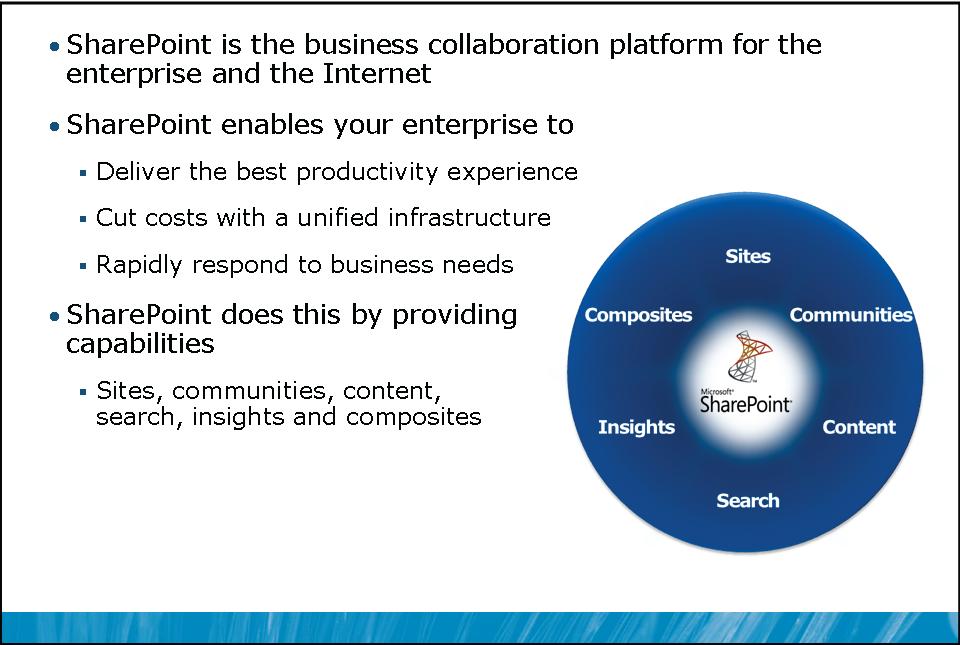
The value proposition for SharePoint is, “SharePoint is the business collaboration platform for the enterprise and the Internet.” Microsoft invested heavily in the development of SharePoint Server 2010 to deliver features that enable an
enterprise to do the following:
- Deliver the best productivity experience. The end-user experience of SharePoint Server 2010 builds on familiar user interfaces and tools.
- Cut costs with a unified infrastructure. SharePoint 2010 performs roles that have been, in many enterprises, provided by other disparate systems. Now those roles can be consolidated on to SharePoint 2010.
- Rapidly respond to business needs. SharePoint 2010 provides a diverse feature set addressing many business collaboration scenarios, with out of box functionality, a rich collection of community-generated solutions, and extensibility to support custom solutions.
The SharePoint Platform

SharePoint is a platform that itself extends and depends on many components of the broader Microsoft technologies suite.
This visualization of the platform shows the dependencies—both required and available—between components of the technology stack. Each component of the platform contributes specific features and functionality.
- Windows Server 2008 or Windows Server 2008 R2 provides the core operating system functionality, including the security subsystem.
- The Microsoft .NET Framework provides the framework for SharePoint, which is a .NET application running within Internet Information Services (IIS).
- SharePoint Foundation 2010 delivers fundamental SharePoint functionality including service management, security, integration with Microsoft Office client applications, and core collaborative features such as lists and libraries.
- SharePoint Server 2010 builds on SharePoint Foundation, adding social networking, enterprise search, business intelligence, and other features.
- SharePoint uses identity services that can include the Active Directory directory service or other Claims-based authentication providers. Some of these identity services, such as forms-based authentication, rely on the .NET Framework.
- SharePoint content is stored in Microsoft SQL Server.
- SharePoint is a highly extensible platform. Independent software vendors (ISVs), the community, customers, and Microsoft itself deliver solutions that depend on SharePoint Foundation or SharePoint Server.
SharePoint Products and Technologies

There is a wide array of products and technologies that make up SharePoint.
SharePoint products and technologies include the following:
- SharePoint Foundation 2010.
- SharePoint Server 2010 for Intranet Scenarios, which is licensed with Standard or Enterprise features. The features provided by SharePoint Foundation 2010 and SharePoint Server 2010 are detailed later in this module.
- SharePoint Server 2010 for Internet Sites, which is licensed for access by large numbers of users and by nonauthenticated users.
- Office Web Apps.
- FAST Search for SharePoint 2010.
- FAST Search for SharePoint 2010 for Internet Sites, which is licensed for access by large numbers of users and by nonauthenticated users.
- Search Server 2010 and Search Server Express 2010, which provide the search functionality of SharePoint Server.
Additionally, a vast selection of community-generated solutions and applications by ISVs extends the capabilities and feature set of SharePoint 2010.
Subscribe to:
Posts (Atom)